
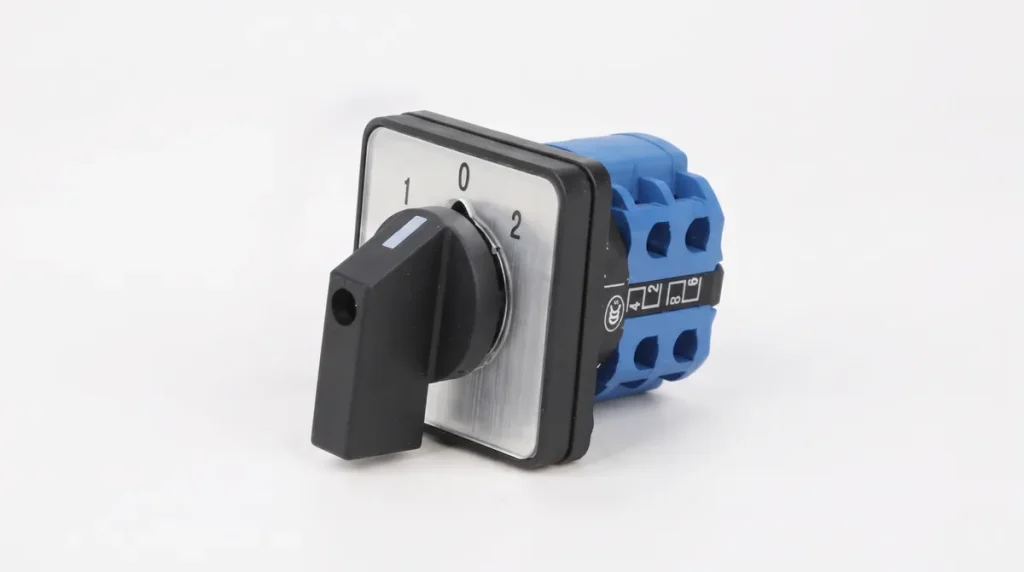
A selector switch is the small knob on a panel door that tells a machine what to do. Hand, off, auto. Local or remote. Pump 1 or pump 2. It looks like a minor part, which is why it is so often bought by looking at a photo. Then the electrician opens the pack and finds a 2-position switch where the drawing needed 3, or a spring-return knob where the pump needed to stay on after he let go.
This guide is about choosing a selector switch properly. We will go through 2-position and 3-position switches, maintained and spring-return action, the contact blocks behind the knob, the rating that matters (it is not the one printed biggest), and a full Hand-Off-Auto wiring example for a pump panel. It is written for the Hyderabad electrician, panel builder and plant maintenance team who is ordering from a counter, not from a catalogue.
What a Selector Switch Does, and What It Does Not
A selector switch is a rotary operator that moves between fixed positions and makes or breaks contacts in each one. In a control panel it normally sits in the control circuit, handling signals and coil currents, not the motor load. The motor current goes through a contactor, a starter or a drive. The selector tells that contactor what mode to be in.
That distinction matters because there are two different families sold under the same name.
- The pilot-device selector. A 22 mm knob that clips onto a door cutout, with one or more stacked contact blocks on the back. This is what most people mean when they say selector switch in a control panel. It is covered by IEC 60947-5-1 for control circuit devices, adopted in India as part of the IS 13947 series.
- The cam or rotary changeover switch. A heavier switch with a stack of cams, typically rated from around 10 A up to 63 A or more. It is made to switch loads directly, for example an ammeter or voltmeter selector, or a manual change between two supplies. These fall under the IEC 60947-3 switch family.
Mixing the two is the commonest buying mistake. A small 22 mm selector will not carry a 16 A heater circuit, and a big cam switch is overkill for a control signal that draws a few hundred milliamps.
2-Position vs 3-Position Selector Switch
The number of positions is the first decision, and it comes straight from your control logic.
2-position selector switch. Two states: for example Manual and Auto, Local and Remote, On and Off, or Pump A and Pump B. The knob stays where you put it. These are the simplest and cheapest, and they work whenever your logic is a clean either-or choice.
3-position selector switch. Left, centre, right. The centre is usually a neutral state, so Hand-Off-Auto is the classic use. Others are Local-Off-Remote, Forward-Off-Reverse for a small motor controlled through two contactors, or Pump 1, Both, Pump 2. A 3-position selector gives the operator a safe middle position where nothing is selected. This is exactly why it is the standard for pump and motor panels.
There are also selector switches with 4 or more positions and some with key operation. A key selector is useful when you do not want an unauthorised person switching an interlock, such as a bypass or a maintenance mode.
Maintained vs spring-return
Both versions come in most position counts, and the choice is easy to get wrong.
- Maintained. The knob stays in the position you left it. Use it for modes: Hand, Auto, Local, Remote.
- Spring-return. The knob snaps back to centre or to one end when released. Use it for momentary actions, like jog, reset, or a lamp test. A spring-return knob in a Hand-Off-Auto pump panel will stop the pump the second the operator lets go.
Some switches combine both: maintained on one side and spring-return on the other. That is handy for “Auto / Off / Hand-jog” arrangements. Read the position diagram carefully. The table of positions in the datasheet is the truth, not the picture of the knob.
Contact Blocks: NO, NC and How Many You Need
The knob does nothing alone. Behind it clips a stack of contact blocks, and each block is normally open (NO) or normally closed (NC). On a selector, “normally” refers to the state in the first position, so the block diagram matters. Before you buy, count what the circuit needs.
For a typical Hand-Off-Auto starter you need at least:
- One NO contact that closes only in Hand, to energise the contactor coil directly.
- One NO contact that closes only in Auto, to pass the start signal from a float switch, timer or PLC.
- A spare NO or NC if the PLC needs to know which mode the switch is in.
Many panels use a two-block stack for this. Add a third block for the status signal. Always buy one more block than the count, because a panel design always grows after the first drawing.
Check how the blocks mount. Front-mounted switches clip the contact blocks onto the back of the operator. Cheaper ones use fixed contacts that you cannot change later, and a wrong stack means replacing the whole switch.
The Rating That Actually Matters: AC-15 and DC-13
Most switches have a big number printed on them, like 10 A. That is the thermal current, and it is not what you use to size the circuit. The meaningful rating is the utilisation category from IEC 60947-5-1.
- AC-15 covers switching electromagnetic loads, such as contactor coils and relay coils, on AC.
- DC-13 covers switching electromagnets on DC.
The AC-15 current is usually far lower than the thermal rating, since a coil draws a high inrush when it pulls in. You will find it written as a current at a voltage, for example a few amperes at 230 V. Check the actual value on the datasheet for the block you are buying and compare it with the contactor coil’s inrush, not just its holding value. A 24 V DC control circuit is kinder to the contacts, but switch it through contacts rated for DC-13, because DC arcs are harder to break.
For low-level signals into a PLC input, which carry only a few milliamps, gold-plated contact blocks are available and worth asking for. Standard silver contacts can pick up oxide over time and give unreliable readings at those tiny currents.
Worked Example: A Hand-Off-Auto Selector Switch on a Pump Panel
This is the setup behind most borewell, booster and sump pump panels, so it deserves a clear walk-through.
The panel has a motor starter: an MCB or MCCB for short-circuit protection, a contactor, and an overload relay. The contactor coil is the thing the selector will control. The panel runs on a 230 V AC control supply, and a float or level switch signals when the tank needs water.
- Hand. The contactor coil is wired through the Hand contact, and a stop circuit with the overload relay’s NC contact in series. The pump runs as long as the knob is in Hand, regardless of tank level. This is used for testing and manual filling.
- Off. Neither contact is made. The contactor drops out and the pump cannot start from either source.
- Auto. The contactor coil is fed through the Auto contact and then through the level switch contact. When the tank drops, the float closes and the pump starts. When the tank fills, the float opens and the pump stops.
Three things make or break this circuit in real life.
First, the overload relay NC contact and the emergency stop must sit in the common path ahead of both Hand and Auto. If they sit only in the Auto leg, the pump can run in Hand with no overload protection at all. It is a common wiring fault, and it is easy to miss on a quick test.
Second, never run the motor itself through the selector contacts. The selector switches the contactor coil, nothing else. A 22 mm contact block was not built for motor current.
Third, think about what happens after a power cut. A maintained Auto setting means that when supply returns, the pump starts by itself if the tank is low. That is useful for water supply and dangerous for machines with open guards. Where it matters, add a no-volt release or a start-up delay, and tell the operator what the panel will do.
For the starter hardware, our ABB contactors and contactor relays and the ABB switchgear range cover the contactor, overload relay and breaker side of the same panel. Motor-side, our ABB motors page is where to start.
Colour, Marking and Mounting Details
Selector knobs are usually black. IEC 60204-1, the machine electrical equipment standard, leaves black, white and grey for general-purpose actuators and reserves red mainly for emergency stops, so a black knob is the safe default. Do not use a red knob on a selector unless it relates to stopping, and never use red-and-yellow, which means emergency stop in its standard form.
On mounting, the standard hole is 22 mm. Check the door thickness against the switch bezel, because very thick doors can leave the retaining nut with too little thread. Use legend plates that show every position in plain words (HAND, OFF, AUTO), not just symbols. In a plant with mixed languages, labels in English plus a local language save arguments at 2 a.m.
For panels in damp or dusty locations, look at the rating of the operator itself, usually IP65 or IP66 at the front, and use a rubber boot if the switch will be washed down. Keep in mind that a door cutout with a loose seal quietly drops the whole panel’s rating.
Cam Switches and Ammeter/Voltmeter Selectors
Not every selector switch is a pilot device. In a three-phase panel with a single ammeter or voltmeter, a cam selector switch lets you read each phase in turn. A voltmeter selector typically offers positions for phase-to-phase and phase-to-neutral readings. An ammeter selector connects the meter to one of three current transformer secondaries, and good ones short the unused CTs so the open secondary never builds a dangerous voltage. If you use a plain switch there, the open CT problem is real, so buy a proper CT-selector type and ask the counter to confirm the shorting-before-breaking action.
For manual changeover between two supplies, such as mains and generator, use a switch built for it with an off position and a break-before-make action. A normal selector is not the right part, and a proper changeover switch or ATS is, because overlapping two live sources can damage equipment and put people at risk.
Why Selector Switches Fail, and How to Avoid It
Selector switches rarely fail loudly. They get worse slowly, and the symptoms are strange enough that people blame the PLC or the contactor first. These are the usual causes.
- Contact wear from overloaded coil circuits. If the block is rated well below the contactor’s inrush, the contacts arc a little on every operation, pit, and eventually weld or fail open. Fix it by using a rated block, or by switching a small interposing relay and letting the relay drive the big coil.
- Loose contact blocks. A block that is not fully clicked onto the operator gives an intermittent signal. Press it until it latches, then tug it gently. This single check solves a surprising number of “ghost” faults.
- Loose terminal screws. Vibration near pumps and compressors loosens screw terminals over months. Re-torque at every scheduled shutdown. Use ferrules on stranded wire so the strands do not splay out.
- Wrong position logic. The datasheet’s position table shows which contact is closed in which position. Wiring from the picture of the knob rather than from this table gives a Hand mode that works as Auto, and the reverse. Test every position with a multimeter in continuity mode before the supply goes on.
- Water and dust through the front. A knob without its sealing boot, or a door cutout cut too large, lets moisture reach the contacts. Corrosion follows within a season or two in humid conditions.
One simple habit pays off: when you commission a Hand-Off-Auto panel, move the knob through all three positions with the supply off, and check the contactor coil terminals for voltage in each position with the supply on and the motor circuit isolated. It takes two minutes and catches wiring errors before the pump does.
Selector Switch vs Push Button vs Toggle Switch
People often ask whether a selector can replace a push button, or whether a toggle switch will do. They solve different problems.
A push button is momentary. It starts or stops a process and returns. A selector holds a mode. If an operator needs to see at a glance that the machine is in Manual, that is a selector job, since the knob position is the information. A toggle switch is a domestic-style part. It lacks the IP sealing, the legend system, the contact block options and the vibration resistance of an industrial 22 mm selector, and it should not go on a machine panel meant to last.
Where the panel needs both, put the mode selector and the start and stop buttons in a clear, logical order on the door, with the emergency stop easiest to reach. A clean front panel layout matters more than it seems, since operators build habits around it.
A Short Checklist Before You Order
- Positions needed, and whether any is spring-return.
- Number and type of contact blocks (NO or NC), plus one spare.
- Control voltage and the contactor coil’s inrush current, checked against the AC-15 or DC-13 rating.
- 22 mm cutout and door thickness.
- Knob type: standard, long-lever, or key-operated.
- Environment: IP rating and legend plate wording.
- Whether you need a cam switch for load or meter switching instead of a pilot selector.
Buying a Selector Switch in Hyderabad
The most common return we see is the wrong block combination, usually caused by buying from a photo. Bring the drawing, or at least a sketch of which positions do what, and a counter that knows panels can build the stack for you. At eNarayan Elex in Rasoolpura we stock panel pilot devices and accessories for control panel builders and maintenance teams. Browse our panel accessories range, and use the control panel accessories buyer’s checklist to catch everything else the panel needs, from terminals to indicator lamps. Stock varies, so confirm the exact model and contact configuration before you commit to a panel build.
Frequently Asked Questions
What is the difference between a 2-position and 3-position selector switch?
A 2-position switch has two states, such as Manual and Auto. A 3-position switch adds a centre position, so the classic Hand-Off-Auto layout is possible. The centre gives the operator a safe Off state where neither mode is active.
What is a Hand-Off-Auto selector switch?
It is a 3-position maintained selector used to control a motor or pump. In Hand the contactor runs continuously. In Off it cannot start. In Auto it starts and stops from an automatic signal such as a float switch, timer or PLC.
Which rating should I check on a selector switch?
Check the AC-15 rating for AC coils or DC-13 for DC coils, not just the thermal current printed on the body. The AC-15 value is usually much lower, because a coil draws extra current when it pulls in.
Can a selector switch control a motor directly?
A small 22 mm pilot selector should not carry motor current. Use it to control a contactor coil, and let the contactor switch the motor. Only a cam switch built for load switching should be used for direct motor switching, and only within its rating.
What is the standard cutout size for a selector switch?
Most panel selector switches use a 22 mm round hole. Always check the datasheet and the door thickness, since the bezel and retaining nut need enough thread.
Maintained or spring-return selector, which one should I buy?
Choose maintained for modes that must stay put, such as Hand, Auto, Local or Remote. Choose spring-return for momentary actions such as jog or reset. A spring-return knob on a pump panel will stop the pump as soon as the operator lets go.
Where can I buy selector switches in Hyderabad?
eNarayan Elex in Rasoolpura, Hyderabad stocks control panel accessories and switchgear. Call 040-66768696 or email sales@enarayan.com with your drawing or position table and we can help you pick the right switch and contact blocks.
Send us your control drawing or the position table, and we will help match the knob, contact blocks and legend plate before you order. Call 040-66768696 or write to sales@enarayan.com.
